Import, export and manage data
Parents can download household data and import records from files in Settings → Your data. Cozibud also accepts structured event imports through its validated API and assistant tooling.
Download and import files
- Download household data (JSON) saves a copy of the household's babies and records.
- Import records takes a Cozibud archive, a generic CSV or a generic JSON file of up to 10 MB. Cozibud inspects the file first and shows what it will add; nothing is saved until you review and confirm. Importing the same unchanged file again recognizes the records already added instead of duplicating them. Download a CSV example shows the expected columns.
Import carefully
- Keep a source copy of the data you intend to import.
- Use the documented integration and preview or validate the batch where available.
- Preserve timestamps, units and stable client event identifiers.
- Review the created events in Cozibud and correct mistakes there.
Up to 500 structured events can be submitted in one supported bulk request. Retrying the same stable identifiers is designed to avoid duplicate creation. Do not convert prose into events by guessing missing dates, units or event types.
Sync sleep from Cradlewise
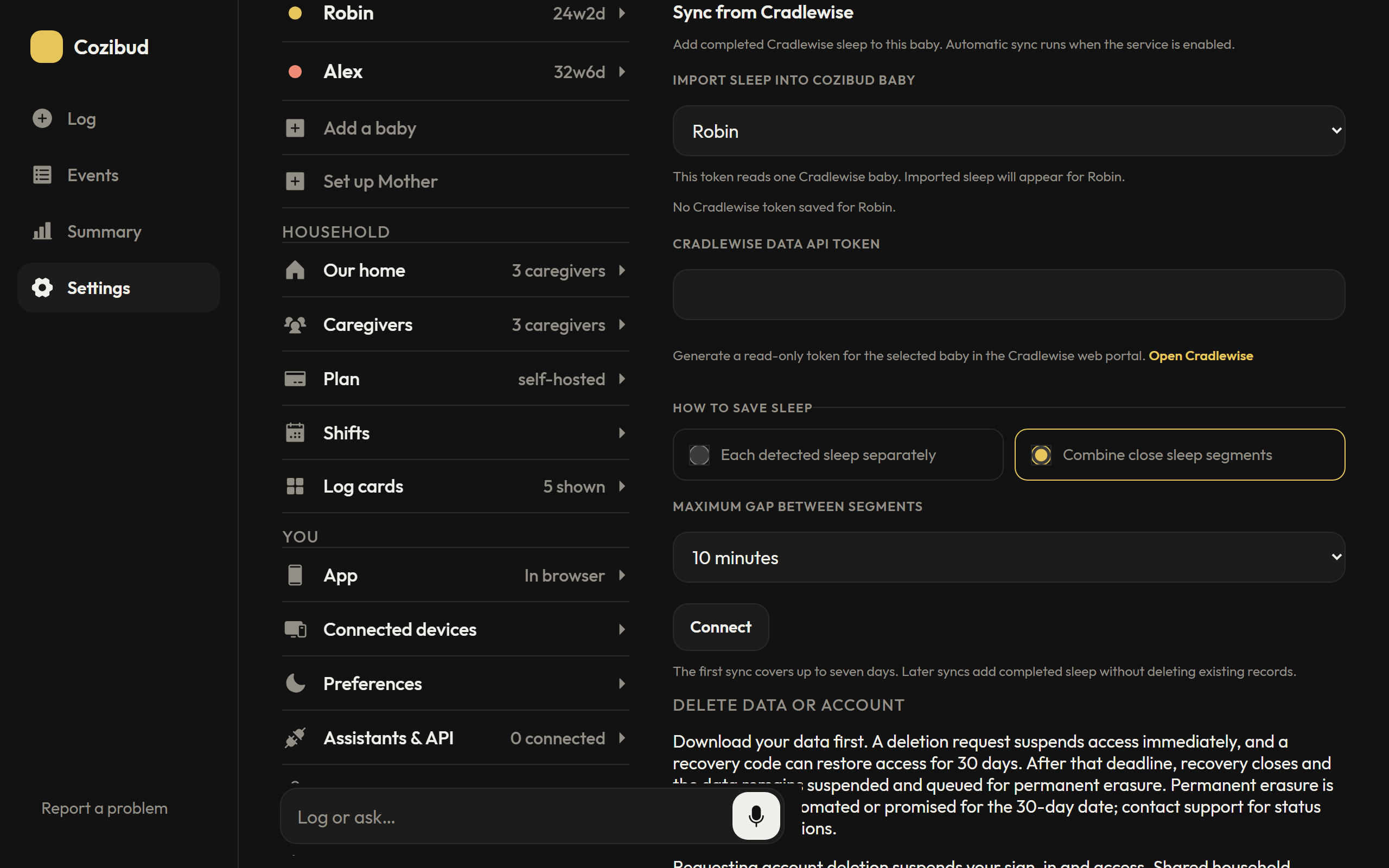
Parents can open Settings → Your data → Sync from Cradlewise, choose the matching Cozibud baby, and enter a read-only Cradlewise Data API token from the Cradlewise web portal. Cradlewise issues one token per baby. Check the baby mapping before connecting.
Choose Each detected sleep separately to save every detected interval, or Combine close sleep segments to save nearby intervals as one sleep. The default maximum gap is 10 minutes and can be changed before the first sync. Combined records retain the detected segments, so the span and actual detected sleep remain distinguishable. Once sleep has been imported for a baby, keep the same grouping choice to avoid duplicate or overlapping records.
The first sync reads up to seven days of history. Automatic sync then runs about hourly when the scheduler is enabled; Sync now requests a read immediately. A one-hour settling window holds recent intervals so short gaps do not split an ongoing nap. The token is encrypted at rest; disconnecting removes it and leaves imported sleep in place. An expired token must be replaced in Settings. Sync never deletes or overwrites existing records. Review imported sleep in the timeline and correct any detection mistakes there.
Settings shows whether a token is saved for the selected baby. Remove saved token stops Cozibud sync and deletes its encrypted copy; revoke the issued token with Cradlewise to invalidate it everywhere.
To change the baby for a saved token, choose Change import baby. Select another Cozibud baby and decide whether past Cradlewise sleep moves with the connection or stays with the original baby while future sleep goes to the new one. The new baby must not already have a Cradlewise connection or imported Cradlewise sleep. The token stays encrypted and does not need to be pasted again.
Import from Huckleberry
Parents can open Settings → Your data → Import from Huckleberry. Sign in there, choose the Huckleberry baby, then explicitly choose the existing Cozibud baby that will receive the records. Add the Cozibud baby first if it does not exist.
The sign-in details are used only to prepare the import and are cleared after the review. Review the totals and any mapping issues before confirming. An issue blocks the import; fix it in the source or use another supported route, then create a new review.
Records are written in atomic batches of up to 500. If a later batch fails, earlier batches remain saved and retrying the same unchanged preview safely recognizes those records. The import does not delete or overwrite records, and it does not automatically match entries that were added manually or by an assistant just because their times look similar. Changes to previously imported records require reconciliation. Active timers are not imported.
If this baby already has records from an earlier Huckleberry importer, the flow stops so those records can be reconciled first without creating duplicates. Some Huckleberry-specific details are retained for recovery but do not appear in the timeline. A growth entry can become several measurement records.
The import plan is limited to 10 MB; provider reading also has bounded response, page, and record limits. Keep your source copy and review the resulting timeline after import.
Export for an assistant
Choose Export for an assistant after selecting the Huckleberry baby to download a versioned JSON file without choosing a Cozibud destination. The file contains source records and mapping context, never credentials. Attach it to an assistant yourself; a connected assistant cannot read a local download automatically. Connect ChatGPT as described in Connect an assistant, attach the file, and ask it to review the records and import them into the baby you select. Some source-only fields may not map to Cozibud; ask the assistant to flag these instead of guessing. Keep one import method for each history unless existing records have been reconciled, because direct and assistant imports use different provenance. Review the resulting timeline.
For incorrect data or a blocked import, use Report a bug and include the support reference if one is shown. The Cozibud maintainer aims to review reports promptly. You can also connect ChatGPT to review and correct records; approve the proposed corrections before applying them. Do not include your Huckleberry password in a report or chat. Operational failures and blocked mapping previews produce privacy-safe alerts; signing in with incorrect credentials does not notify the maintainer.
Export and deletion

Download your data first. Review household deletion or Review account deletion shows what will be affected before you confirm. A deletion request suspends access immediately. Save the recovery code it gives you: it restores access for 30 days. After that, recovery closes and the data stays suspended until it is permanently erased.